
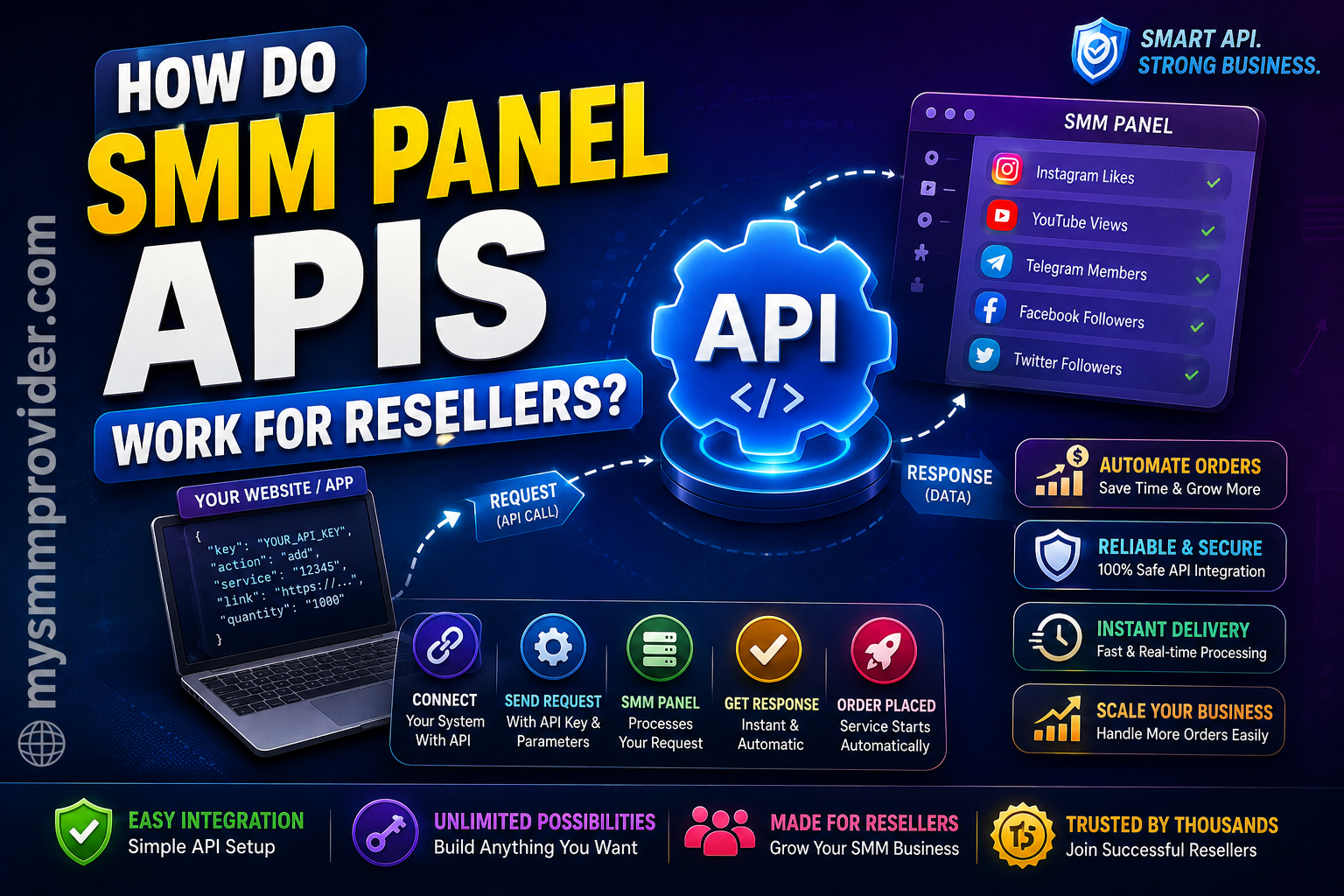
How Do SMM Panel APIs Work for Resellers? (Ultimate Technical Guide)
If you are planning to start an SMM business or scale your existing digital marketing agency, you have likely come across the term "API." Manually processing hundreds of client orders for Instagram followers, YouTube views, or TikTok likes is virtually impossible. This operational bottleneck is exactly where an SMM Panel API becomes your most valuable asset.
An API (Application Programming Interface) acts as the invisible engine powering the entire wholesale social media marketing industry. It allows your reseller storefront to communicate directly with a main provider, seamlessly fulfilling orders without you ever having to click a single button.
But how exactly does this technical bridge work? What happens to the data between the moment your client clicks "buy" and the moment their social media profile starts growing? In this comprehensive, developer-friendly guide, we will break down exactly how SMM panel APIs work for resellers. From understanding basic JSON requests and HTTP status codes to securing your endpoints and integrating automation via PHP or Python, this guide covers everything you need to build a highly profitable, fully automated SMM Reseller Panel.

A modern developer reviewing SMM Panel API documentation to automate a reseller workflow.
Table of Contents
- What Is an SMM Panel API?
- What Is an SMM Reseller?
- Why APIs Matter for SMM Resellers
- How SMM Panel APIs Work (Step-by-Step)
- Understanding API Requests
- Sample API Response
- Popular API Actions
- Real Example Workflow
- API Integration Methods (Code Examples)
- Benefits of Using API
- Common API Errors & Troubleshooting
- Best Practices for Developers
- Security Tips
- Why Choose MySMMProvider API?
- Frequently Asked Questions
- Final Verdict
What Is an SMM Panel API?
An SMM Panel API is a set of programmable rules and protocols that allows two different web applications to talk to each other securely over the internet. In the context of Social Media Marketing, the API allows a reseller's website (your panel) to connect directly to a main provider's server (like MySMMProvider).
Think of the API as a digital waiter in a restaurant. You (the reseller panel) hand your order to the waiter (the API). The waiter takes the order to the kitchen (the main provider's server), where the meal (the social media service) is prepared. Once it's ready, the waiter returns to give you a status update. This entire data exchange happens in milliseconds using simple text formats, most commonly JSON (JavaScript Object Notation), removing the need for a human to manually log in and place the order.
What Is an SMM Reseller?
An SMM Reseller is a business owner, agency, or entrepreneur who purchases social media engagement services (like Instagram followers, YouTube views, and Telegram members) at bulk wholesale prices from a primary provider and sells them to retail clients at a marked-up price.
The beauty of the SMM Business model is that resellers do not need to own massive server farms, bot networks, or complex delivery architectures. Using a White Label SMM Panel, a reseller can set up their own branded website, set their own profit margins, and let the backend API handle the actual delivery of the services transparently.
Why APIs Matter for SMM Resellers
If you are only handling two or three orders a day, manually copying a client's Instagram link and pasting it into your provider's dashboard is manageable. But what happens when your marketing campaigns succeed and you start receiving 500 orders a day?
Without an API, you would have to hire a team of virtual assistants to sit at a computer 24/7, manually typing in URLs, selecting service IDs, checking balances, and updating clients on order statuses. Human error would skyrocket—links would get pasted incorrectly, wrong services would be selected, and order delivery times would plummet.
| Feature | Manual Dashboard Ordering | API Automated Ordering |
|---|---|---|
| Speed | Takes 2-5 minutes per order. | Instantaneous (milliseconds). |
| Availability | Depends on human working hours. | Runs 24/7/365 without sleep. |
| Error Rate | High risk of copy/paste mistakes. | Zero data entry errors. |
| Status Updates | Must be checked and updated manually. | Automatically syncs to your client dashboard. |
| Scalability | Impossible to scale efficiently. | Can process 10,000+ orders simultaneously. |
The Best SMM Provider APIs, such as those powering SMM Automation today, solve this by enabling synchronous and asynchronous HTTP requests. The API acts as a silent, flawless employee processing Bulk SMM Orders instantly.
How SMM Panel APIs Work (Step-by-Step)
To truly master SMM API Integration, you must understand the complete lifecycle of an order. The technical journey from your client's browser to the social media platform involves multiple handshakes between servers. Here is the exact workflow:
- Customer Places Order: A retail client visits your white-label panel, selects "1,000 Instagram Followers," pastes their profile link, and pays via your payment gateway.
- Reseller Website Receives Order: Your panel's server stores the order in your local database with a status of "Pending."
- API Request Sent: Your server automatically triggers a background script. It creates a POST request containing your secret API Key, the target link, quantity, and the specific Service ID, sending this payload to the main provider's endpoint.
- Provider Accepts Order: The provider's server receives the request. It instantly authenticates your API key, checks your account balance to ensure you have enough funds, and validates the target link format.
- Order ID Returned: If everything is valid, the provider deducts the wholesale cost from your balance and replies to your server with a JSON response containing a unique Provider Order ID.
- Order Processing Starts: The main provider adds the task to their internal delivery queue, pushing the metrics to the target social media profile.
- Status Updates via API: Periodically, your panel uses the API to send a "Status Check" request using the Order ID. The provider responds with the current status (Processing, Partial, Completed, or Canceled).
- Order Completed: Once the provider finishes the delivery, your next API status check receives a "Completed" status. Your panel updates your retail client's dashboard automatically.
The API Data Flowchart
[ Retail Customer ]
       │
       ▼ (Submits Link & Payment)
       │
[ Reseller Panel (Your Website) ]
       │
       ▼ (Sends HTTP POST Request with API Key + Service Data)
       │
[ MySMMProvider API Gateway ] ──► [ Database: Auth & Balance Check ]
       │
       ▼ (Returns Success JSON + Order ID)
       │
[ Core Delivery Servers ]
       │
       ▼ (Executes Automation Scripts)
       │
[ Target Social Media Platform ]

Visualizing data communication between a reseller server and a top-tier SMM provider.
Understanding API Requests
An API request is simply a specifically formatted message sent to a URL. To use an API SMM Panel successfully, you need to understand the standard parameters passed in a typical HTTP POST request. Every request requires authentication and an action command.
- API URL: The base endpoint where all requests are sent (e.g.,
https://mysmmprovider.com/api/v2). - API Key: A long, secret alphanumeric string unique to your account. It acts as your username and password combined.
- Action: What you are telling the API to do. Common actions are
add(create order),status(check order), orbalance. - Service ID: A numeric code representing the specific service you want to buy. (e.g., ID
105might be "High-Quality Instagram Followers"). - Link: The URL of the target social media post or profile.
- Quantity: The number of interactions you want to deliver (e.g.,
1000).
Sample API Response
Once the provider processes your request, it sends back a response in JSON format. JSON is incredibly lightweight and easily parsed. If your order is successful, the response will look like this:
{
    "order": 9845723
}
In this example, 9845723 is the unique identifier for the transaction on the provider's end. Your panel's database must save this number, as you will need it to check the status of the delivery later.
If there is an issue with your request, the API will return an error JSON:
{
    "error": "Quantity exceeds the maximum limit for this service."
}
Popular API Actions
A robust API Documentation will outline several primary actions you can execute:
- The
addAction: Used to place a new order. Requires service ID, link, and quantity. - The
statusAction: Used to check the progress of an existing order using the Order ID. Returns data likestatus,remains, andstart_count. - The
balanceAction: Used to check your available wholesale funds on the parent provider. - The
servicesAction: Fetches the entire catalog of the provider, including pricing and limits. Reseller panels use this to auto-sync services. - The
refillAction: Triggers the provider's automated refill system if an order experiences drops.
Real Example: The Flow of a YouTube Order
Imagine your agency offers a YouTube SMM Panel package. A musician wants to push their new music video. Here is the exact API sequence:
- The musician pays you $50 for 10,000 high-retention YouTube views.
- Your server queries the
balanceendpoint to confirm you have your $10 wholesale cost available. - Your server sends an
addrequest via API. - The API responds with
{"order": 559922}. - Every 6 hours, your server sends a
statusrequest for order559922. - The API responds with
"status": "Partial", "remains": "4000". Your website displays to the musician: "60% Complete". - Two days later, the API responds with
"status": "Completed". Your panel emails the musician automatically.
API Integration Methods (Code Examples)
Modern SMM APIs use standard REST-like HTTP calls. Below are practical code snippets developers use to integrate the API.
1. cURL (Command Line)
curl -X POST https://mysmmprovider.com/api/v2 \
     -d "key=YOUR_API_KEY" \
     -d "action=add" \
     -d "service=101" \
     -d "link=https://instagram.com/p/abcdef" \
     -d "quantity=500"
2. PHP Example
<?php
$api_url = 'https://mysmmprovider.com/api/v2';
$api_key = 'YOUR_API_KEY';

$post_data = array(
    'key' => $api_key,
    'action' => 'add',
    'service' => 101,
    'link' => 'https://instagram.com/username',
    'quantity' => 1000
);

$ch = curl_init();
curl_setopt($ch, CURLOPT_URL, $api_url);
curl_setopt($ch, CURLOPT_POST, 1);
curl_setopt($ch, CURLOPT_POSTFIELDS, http_build_query($post_data));
curl_setopt($ch, CURLOPT_RETURNTRANSFER, true);
$response = curl_exec($ch);
curl_close($ch);

$result = json_decode($response, true);
if(isset($result['order'])) {
    echo "Success! Order ID: " . $result['order'];
} else {
    echo "Error: " . $result['error'];
}
?>
3. Python Example
import requests

url = "https://mysmmprovider.com/api/v2"
payload = {
    "key": "YOUR_API_KEY",
    "action": "status",
    "order": "123456"
}

response = requests.post(url, data=payload)
data = response.json()

if "status" in data:
    print(f"Order Status is: {data['status']}")
else:
    print(f"Error: {data.get('error')}")
4. Node.js Example
const axios = require('axios');

const placeOrder = async () => {
    try {
        const response = await axios.post('https://mysmmprovider.com/api/v2', new URLSearchParams({
            key: 'YOUR_API_KEY',
            action: 'add',
            service: '101',
            link: 'https://instagram.com/user',
            quantity: '500'
        }));
        console.log('API Response:', response.data);
    } catch (error) {
        console.error('Request failed:', error.message);
    }
};

placeOrder();
Benefits of Using API for Your SMM Business
- Complete Automation: Sleep while your panel processes thousands of dollars in transactions.
- Faster Delivery Times: Orders are instantly passed to the provider, starting in seconds.
- Massive Scalability: Managing 10 orders takes the exact same effort as managing 10,000 orders.
- Reduced Human Error: Zero copy/paste mistakes means fewer refunds and happier clients.
- Dynamic Pricing: Auto-adjust your retail prices if the wholesale provider changes theirs.
Common API Errors & Troubleshooting
- "Invalid API Key": Happens if you copy-pasted your key with an accidental trailing space or forgot to update your script after generating a new key.
- "Invalid Service ID": Providers update services based on social media algorithm changes. Map your panel to auto-sync services daily via the API.
- "Invalid Link Format": The end customer pasted a broken URL. Implement URL validation rules on your own panel frontend.
- "Insufficient Balance": Your wholesale account balance has dropped to zero. Set up low-balance email alerts.
- "Timeout": Network latency between servers. Implement Retry Logic in your code.
Best Practices for Developers
- Implement Retry Logic: If an API request times out, wait 2 seconds and retry. Do not instantly mark it as failed.
- Extensive Logging: Log every raw API request and response into your database to troubleshoot client complaints.
- Order ID Mapping: Keep a strict relational mapping between your internal panel Order ID and the external Provider Order ID.
- Frontend Validation: Check that quantities meet minimum/maximum rules locally to reduce unnecessary API calls.
Security Tips for SMM Resellers
An API key is effectively a blank check to your wallet balance. Protect your endpoints aggressively:
| Security Protocol | Why It Is Important |
|---|---|
| IP Whitelisting | Ensures the provider only accepts API requests from your server's exact IP address. Stolen keys become useless elsewhere. |
| HTTPS Encryption | Sending data over plain HTTP exposes your API key to network packet sniffing. Always use SSL/TLS. |
| Environment Variables | Never hardcode your API key directly into public PHP files. Store them in a secure .env file. |
| Rate Limiting | Protect your own frontend with ReCAPTCHA to stop bots from submitting spam orders that drain your wholesale balance. |
Why Choose MySMMProvider API?
Your reseller panel is only as strong as the wholesale provider powering it. Top-tier agencies choose the MySMMProvider infrastructure for our Fast API that processes concurrent requests flawlessly.
- High Uptime & Stability: Backed by load-balanced cloud servers ensuring your API requests never time out.
- Developer Friendly: Comprehensive API documentation that plugs perfectly into standard panel scripts (PerfectPanel, SmartPanel).
- Affordable Pricing: Direct wholesale rates allowing you to build highly profitable retail margins.
- Secure Infrastructure: Full HTTPS encryption, strict IP whitelisting options, and rigorous anti-DDoS protection.
- Instant Updates: Real-time status callbacks and synchronous order placement.
Frequently Asked Questions
1. What is an API in an SMM Panel?
An API (Application Programming Interface) is a backend communication bridge that allows a reseller's SMM panel to automatically send order details to a main provider's server without manual intervention.
2. How much does it cost to use the SMM API?
Accessing the API itself is completely free on platforms like MySMMProvider. You only pay the wholesale cost for the actual social media services ordered through the API.
3. Do I need to be a coder to use an API SMM Panel?
No. Most modern reseller scripts (like PerfectPanel) have built-in API support. You simply paste your API Key and the API URL into your admin settings, and the script handles the code logic automatically.
4. What happens if I send a wrong URL via the API?
A well-designed API will instantly reject the request, returning an error JSON string like "Invalid Link," and your account balance will not be deducted.
5. Can the API check my account balance?
Yes. Using the action=balance command, your server can retrieve your current funds in real-time to ensure you have enough money to process new client orders.
6. Is it possible to connect multiple SMM panel APIs to my website?
Yes. Advanced resellers often route different services to different providers. For example, they might use Provider A for Instagram followers and Provider B for YouTube views, managing both via separate API endpoints.
7. What is API IP Whitelisting?
It is a critical security feature where you tell the main provider to only accept API commands originating from your website's specific server IP address, preventing hackers from exploiting a stolen key.
8. How fast are API orders processed?
API data transmission takes milliseconds. The actual start time of the service delivery depends on the specific social media service logic, but the hand-off is practically instant.
9. What formats do SMM APIs support?
Almost all SMM panels accept standard URL-encoded POST requests and return data exclusively in JSON format due to its lightweight and universally parsable nature.
10. How do I automate the syncing of new services?
By setting up a cron job on your server that calls the action=services API endpoint daily. Your script can compare the provider's active catalog to your own database and auto-update pricing and availability.
11. What is an API Order ID?
It is a unique transaction number generated by the main provider when they successfully accept your order. You must save this ID to request status updates later.
12. Can I submit bulk orders through the API?
Yes. While you can send rapid sequential single orders, some advanced API structures offer an action=bulk_add endpoint allowing you to pass an array of hundreds of orders in a single payload to conserve server resources.
13. Does the API automatically issue refunds for failed orders?
If a provider marks an order as "Canceled" or "Partial" on their end, the funds are returned to your provider balance. Your local script must detect this "Canceled" status via the API and automatically issue a local refund to your retail client's wallet.
14. What programming languages support SMM APIs?
Any language capable of making HTTP requests can interact with the API, including PHP, Python, Node.js, Ruby, Java, C#, and even simple bash scripts using cURL.
15. Why did my API request return a "500 Internal Server Error"?
A 500 error means the main provider's server crashed or experienced a critical database failure while processing your request. Implement retry logic and contact the provider's support if it persists.
16. Can an SMM API track follower drops?
The API tracks the delivery state (completed, partial, processing). If the service has a refill guarantee, you can programmatically send a refill action via the API to trigger a top-up if drops occur.
17. What is a "White Label" SMM Panel?
A white label panel is a reseller website that carries your custom branding, logo, and domain name, but functions entirely on the backend API of a larger, hidden provider.
18. Is it legal to use an SMM Panel API?
Yes, using an API to transmit data is a standard global software practice. However, you should always ensure the services you are routing comply with your region's digital marketing regulations.
19. How often should my panel check for order statuses?
It is best practice to run cron jobs for status updates every 5 to 15 minutes. Checking statuses every single second creates unnecessary server load and may trigger API rate limits.
20. How do I generate an API Key on MySMMProvider?
Simply create an account on MySMMProvider, log into your dashboard, navigate to the API or Account Settings tab, and click "Generate New API Key". Keep this string strictly confidential.
Final Verdict
Understanding exactly how SMM panel APIs work for resellers is the watershed moment separating small-time operators from massive, scalable agencies. By leveraging a robust API, you eliminate manual labor, eradicate data entry errors, and build a system capable of generating passive revenue 24 hours a day.
However, the automation is only as reliable as the API providing it. Poorly built backend servers will result in dropped orders, slow responses, and angry clients. You need an infrastructure designed specifically for high-volume resellers.
Ready to build a flawless, automated digital marketing business? Stop wasting time on manual entries. Access industry-leading pricing, unparalleled server stability, and seamless developer endpoints by partnering with the best. Integrate the MySMMProvider API today and watch your reseller margins soar.